
Why Is My Passive GPU Overheating? Airflow for H100 PCIe, L4 and A10
A passive data center GPU has no fan. It overheats when the server does not force enough air through its heatsink, so fix the airflow path, not the card.
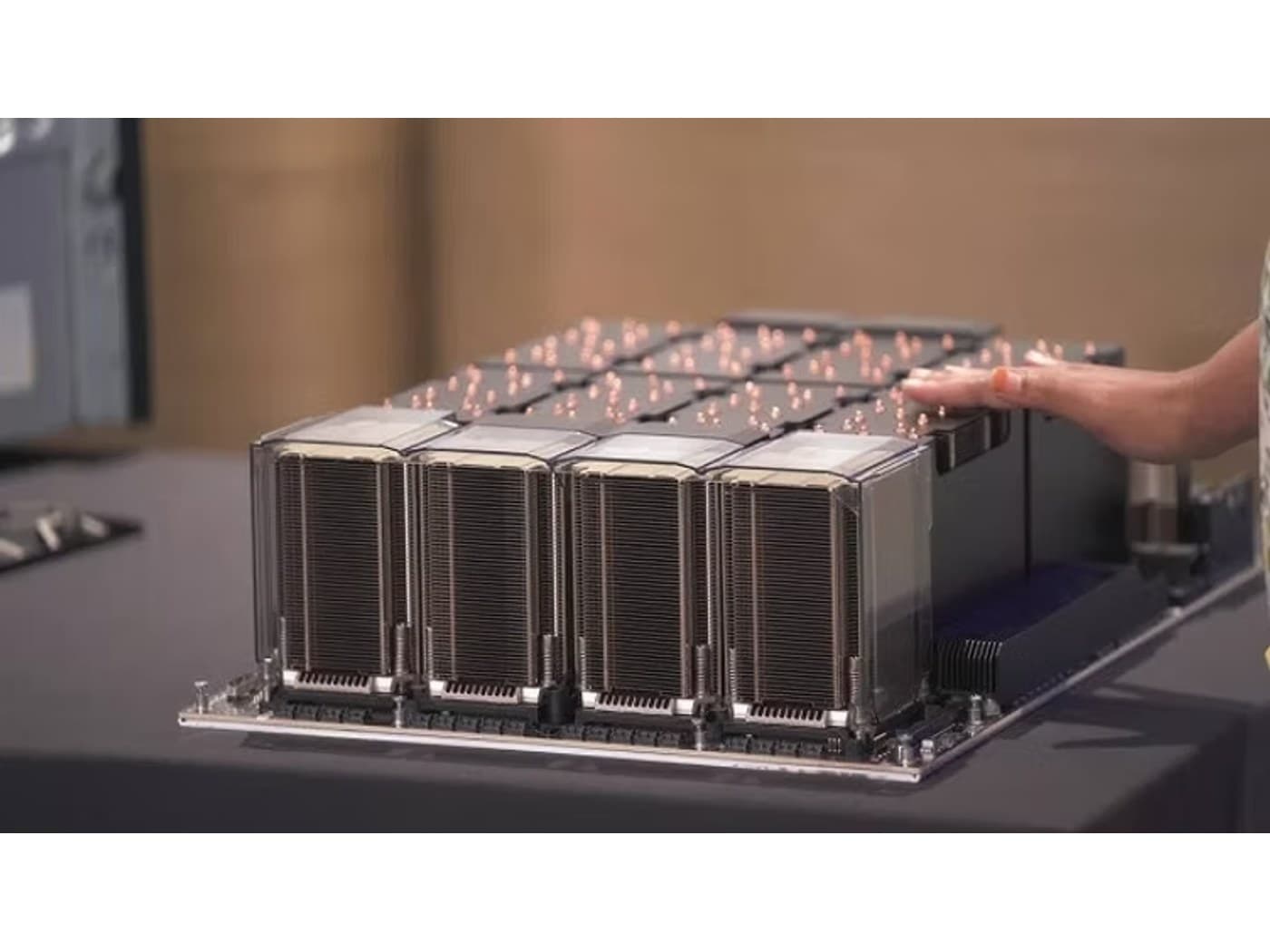
When a data center GPU throttles, drops off the PCIe bus or shuts a server down under load, the card is rarely defective. Most accelerators built for servers are passively cooled, including the NVIDIA H100 80GB PCIe at 350W TDP, the NVIDIA A10 24GB at 150W and the NVIDIA L4 24GB at 72W. Each carries a finned heatsink and no fan of its own. The server is the other half of the cooling system, and if the server does not push enough air through the card, the GPU's only defense is to slow itself down.
Why is my passive GPU overheating?
A passive card is designed on the assumption that the chassis delivers a set volume of air, at a set inlet temperature, straight through the heatsink from one end to the other. The GPU vendor publishes that requirement in the card's thermal documentation, and server makers qualify specific slots, risers and fan configurations against it. Break any part of that assumption and temperatures climb quickly, because a 350W part with no fan has nothing else to fall back on. These are the failures we see most often:
- Missing air baffle or shroud. GPU-ready servers use ducting that forces air through the riser area. That is why the HPE NVIDIA L4 accelerator kit includes an air baffle and the Dell NVIDIA L4 GPU kit includes a shroud.
- Open slots and bays. Air takes the path of least resistance. Empty drive bays, uncovered PCIe slots and missing rack blanking panels let air bypass the card's fins entirely.
- A fan profile that cannot see the GPU. Server fans ramp on sensor readings. If the management controller does not read the card's temperature, the fans can sit at a quiet default while the GPU heats up.
- The wrong slot. Many servers only guarantee GPU airflow in specific riser positions. A card fitted outside the ducted path can starve even inside a GPU-capable chassis.
- Hot inlet air. Exhaust recirculating from the hot aisle raises the temperature of the air before it ever reaches the card.
- Cards stacked back to back. A second high-TDP card directly downstream of, or tight against, another can end up breathing pre-heated air.
How do I confirm the GPU is thermally throttling?
Reproduce the problem under sustained load, because a passive card can look healthy at idle and during short tests. On NVIDIA cards, run nvidia-smi -q -d TEMPERATURE,PERFORMANCE while the job is running. It reports the GPU temperature, the slowdown and shutdown thresholds, and the reasons the clocks are currently being held back, including thermal slowdown flags. At the same time, read fan speeds and inlet temperature from the server's management controller (iDRAC, iLO or the IPMI interface). The two readings together tell you where to look. If the GPU temperature climbs while the server fans stay slow, the problem is fan control: the platform is not responding to the card. If the fans are already at high speed and the GPU still runs hot, the problem is the airflow path or the inlet air, and turning the fans up further will not fix it.
What airflow does a passive GPU need?
There is no single airflow figure that covers every card. The requirement rises with power and with inlet temperature, and each GPU vendor specifies it per product, so check the thermal section of the card's product brief and the server's GPU configuration guide. As a rule of thumb, compare TDPs: the L4 at 72W, the AMD Instinct MI210 at 300W and the H100 PCIe at 350W are very different heat loads. A server configuration that comfortably cools a low-profile 72W card can be completely inadequate for a full-height 350W one.
- Air must flow through the card, aligned with the heatsink fins, in the direction the card is designed for.
- Fans need enough static pressure to push air through a dense fin stack. That is why server fans are small, fast and loud rather than large and quiet.
- Ducting has to stop air escaping around the card instead of through it.
- Fan control must respond to GPU temperature, not only CPU and inlet temperature.
- Inlet air has to stay inside the server vendor's supported range for that GPU configuration, which is often tighter than for the same server without GPUs.
Our catalog labels every card by cooling type, so the requirement is visible before you order. Cards listed as passive, needs server airflow or as passive with directed chassis airflow depend entirely on the host for cooling.
Can I put a passive data center GPU in a workstation?
Not reliably, and not for sustained work. A tower workstation moves a large volume of low-pressure air through the case, and most of it flows around a passive card rather than through its heatsink, which is enclosed along its length and open only at the ends. The card may boot and pass a short benchmark, then throttle within minutes of real training or inference load. Improvised fixes such as 3D-printed ducts with add-on blower fans exist, but they are unsupported, unvalidated for the card's heat load, and they put an expensive part at risk.
If the machine is a workstation, buy a workstation card. The NVIDIA RTX PRO 4000 Blackwell 24GB is a 140W card listed with an active blower (a passive variant exists for servers), and the rest of the active blower range carries its own fan and exhausts out of the rear bracket. Our workstation cooling and acoustics guide covers the thermal side of desktop builds. If the workload genuinely needs an H100-class card, put it in a server designed for it, such as the platforms on our H100 servers page.
Does a GPU-capable server guarantee the card will stay cool?
No. "Supports GPUs" on a datasheet usually means specific cards, in specific slots, with a specific riser, fan kit and power supply. This is why OEM GPU kits exist. The Dell NVIDIA L4 GPU kit bundles the GPU, riser bracket, power cable and shroud and is qualified for PowerEdge R750, R760, R7525 and XE series servers. The HPE NVIDIA L4 kit bundles the riser cage, power cable and air baffle for ProLiant DL380, DL385 and Apollo series. Both carry OEM-qualified firmware that reports correctly to the management controller, which is what lets the server raise fan speed on GPU temperature. A retail-packaged card can run well in the same server, but read the platform's GPU configuration guide first. It will state which slots are supported, whether a high-performance fan option or GPU enablement kit is required, and any inlet temperature limit that applies once GPUs are installed.
Which fixes actually work?
- Fit the OEM air baffle or GPU shroud, plus blanks for every empty PCIe slot and drive bay.
- Move the card into a slot the server vendor qualifies for GPUs of that power and size.
- Select the vendor's GPU or high-performance fan profile, or apply a fan speed offset in the management controller if the card is not recognized.
- Update BMC and BIOS firmware so the platform recognizes the card and its temperature sensor.
- Install rack blanking panels and measure the actual inlet temperature at the server's front.
- Spread high-TDP cards across risers as the server guide recommends, instead of packing them together.
- If the chassis has no qualified configuration for the card, change the server. More fans pointed at the wrong place will not substitute for designed airflow.
A passive GPU is half of a cooling system. The server supplies the other half, so specify and validate them as a pair.
Once each server is right, the rack and the room become the limit. Dense GPU racks put more heat into the aisle than general-purpose racks, which raises inlet temperatures for everything nearby. Our guides to H100 server power and cooling and server rack cooling, air versus liquid cover that level of planning.
Nexus Compute supplies new passive and actively cooled GPUs through authorized distribution, with the full manufacturer warranty, and checks compatibility against your platform before dispatch. Send us the server model, riser configuration and the card you have in mind, and we will confirm the cooling kit it needs and quote within 48 business hours.
Frequently asked questions
Why is my passive GPU overheating?
Because the server is not moving enough air through the card's heatsink. The common causes are a missing air baffle or shroud, open slots and bays that let air bypass the card, a fan profile that does not react to GPU temperature, a slot outside the ducted airflow path, or hot inlet air recirculating from the hot aisle.
Can I put a passive data center GPU in a workstation?
Not for sustained work. Workstation case fans move low-pressure air around a passive card rather than through its enclosed heatsink, so the card throttles under real load. Choose an actively cooled card from the active blower range for a desktop, and keep passive cards in servers qualified for them.
What airflow does a passive GPU need?
It needs directed, front-to-back airflow through its fins at a volume and inlet temperature the GPU vendor specifies for that card. The requirement grows with TDP, so a 350W H100 PCIe needs far more cooling than a 72W L4. Check the card's product brief and the server's GPU configuration guide for the exact figures.
Will a passive GPU damage itself if it overheats?
Data center GPUs have built-in thermal protection: they reduce clocks as temperature rises and shut down at a critical threshold. That protects the card from immediate failure, but you lose performance, and running constantly near the limit is not how the card is meant to operate. Treat throttling as a fault to fix, not a normal state.
Do OEM GPU kits cool better than a retail card?
The GPU is the same, but the kit adds the parts that make cooling work in that chassis. The Dell L4 kit includes a riser bracket, power cable and shroud, and its firmware reports correctly to the management controller, so the server can ramp fans on GPU temperature.
Systems covered in this article
Passive GPUs: directed chassis airflow
Every card that depends on server fans for cooling, with specs per model.
Active blower GPUs
Cards with their own fan, for workstations and chassis without GPU ducting.
H100 server power and cooling
Rack-level power and heat planning once the servers are right.
H100 servers
Platforms designed around passive H100 cards and their airflow.
Planning a hardware investment?
Tell us what you're trying to build. A procurement specialist will help you specify and quote the right configuration within 48 business hours, no obligation.